Screw Land 3D
- 4.8
- Rating
- 1.00M
- Installs
- Free
- Price

 Analysis by App-foxy
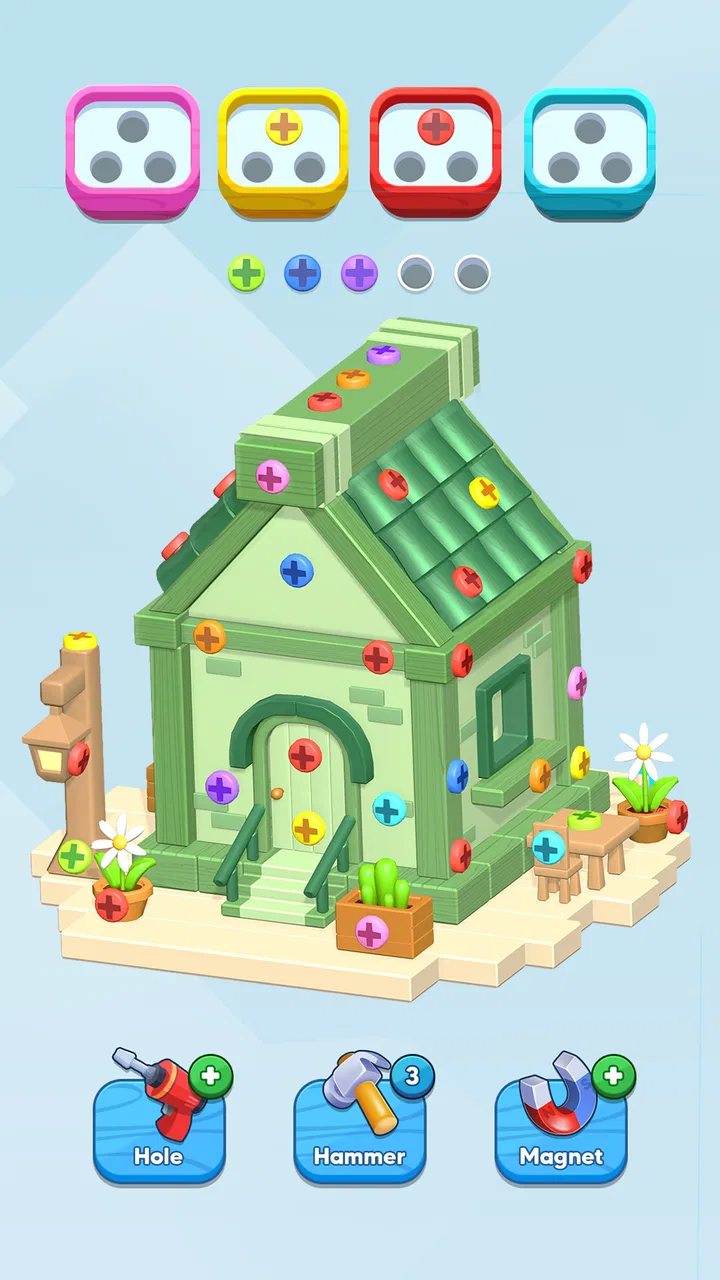
I spent time with Screw Land 3D as a casual puzzle game, and my first impression was that it is much more about patience and visual order than fast reflexes. The basic idea is easy to understand: you work through three-dimensional screw arrangements, decide what should move first, and gradually clear the structure without losing track of the pieces around it. That makes it approachable, but the spatial presentation gives it more depth than a flat matching game.
PixOn Games has built this as a free puzzle experience for Android, with an Everyone content rating and support for devices running Android 6.0 or later. It has already passed one million installs and holds a 4.8 average from around twenty-nine thousand ratings, which matches my general feeling that the game is easy to pick up and satisfying for a broad audience. Still, popularity does not make every level equally enjoyable, so I paid particular attention to the moments where the design feels clever and the points where the experience becomes repetitive.
How the basic workflow feels in practice
My usual session starts by looking at the whole object before touching anything. That small pause matters. The temptation is to remove the most obvious screw immediately, but a move that looks harmless can expose a less useful arrangement or leave an important piece blocked. I found it better to treat each level as a short planning exercise: identify the visible options, consider which parts may become accessible, and only then begin twisting and sorting.
You May Also Like

 Blood Strike: 2.5 Anniversary
Blood Strike’s Loadouts Turn Every Drop Into a Tactical Gamble
A close look at Blood Strike’s custom loadouts: how fast access to signature weapons reshapes its battle royale rhythm, rewards preparation, and narrows the gap between fights.

 Pandora - Music & Podcasts
Pandora’s Music Is Easy to Start, but Harder to Recover
Pandora’s strength is its low-effort path from a seed to a station. Its weak spot is how much confidence it asks you to place in connection, setup, and quiet recovery.

 8 Ball Pool
 Is Built on Rivalries, Rematches, and Routine
A close look at the rivalries, rematches, shared routines, and unanswered safety questions that turn a quick pool match into a persistent mobile community.

 Samsung Music
’s Quiet Strength Is Playing What You Already Own
Its reach comes less from spectacle than from dependable access to a personal library. That simplicity is both the app’s strongest retention engine and its ceiling.

 AccuWeather: Weather Radar
AccuWeather Review: A Quick, Clear Forecast for Everyday Decisions
For everyday plans, the best forecast is the one you can understand quickly. AccuWeather makes rain timing, radar, and local conditions easy to act on, with a few trade-offs.

 Hill Climb Racing
Why Hill Climb Racing Still Turns Crashes Into One More Run
A tiny car, a bumpy hill and one more upgrade: Hill Climb Racing keeps resurfacing because its simple chaos makes every near-miss feel personal.
More From Our News Desk



The controls are built around the central actions suggested by the game itself: selecting screws, changing their position, and working through the three-dimensional construction. The learning curve is gentle because the objective is visually clear. I did not need a long tutorial to understand what I was trying to accomplish, although understanding the goal is not the same as solving every layout efficiently.
A realistic use case is a short break while waiting for an appointment. I can play one puzzle with sound lowered, stop after a successful solution, and return later without needing to remember a complicated story or a large set of rules. It also works well when I want something more active than scrolling but less demanding than a competitive game. The mental effort is present, yet the game does not ask me to react within a split second.
The most useful habit is to keep the camera and the object under control rather than making moves while looking at only one face. Three-dimensional puzzles punish tunnel vision. A screw that seems isolated from the front may be tied to the order of pieces behind it, and a newly exposed section can change the best route. I recommend rotating the structure deliberately after important removals, not constantly. Too much movement makes it harder to build a mental map.
That workflow also reveals one of the game’s strongest qualities: the satisfaction comes from understanding the arrangement, not merely tapping until something happens. When I solve a difficult section, I usually know why it worked. The game rewards a repeatable thought process—scan, identify dependencies, make a safe move, rescan—rather than luck.
Settings that are worth checking before a long session
I would begin with the audio controls. Puzzle games often feel better with small sound cues, but they are not essential to understanding the board. If I am playing in a quiet room, I keep the volume modest; if I am using the game as a quick distraction in public, I lower it or turn it off. This is a simple adjustment, but it prevents the familiar problem of opening a casual game and immediately having to manage unwanted noise.
It is also worth checking how the game behaves on your particular phone before committing to a long session. The minimum operating system is Android 6.0, so compatibility is broad, but older hardware can still make any three-dimensional scene feel less comfortable than it does on a newer screen. I prefer to test touch accuracy and rotation responsiveness during the first few puzzles. If the object does not follow my finger cleanly, careful planning becomes frustrating rather than rewarding.
Screen brightness is another practical consideration. The pieces can contain small visual details, and a dim display makes the edges harder to read. I normally use a comfortable middle brightness instead of relying on an aggressive battery-saving setting. This is especially helpful when the puzzle contains several similar parts and I need to distinguish what is fixed, what is removable, and what has just become visible.
Because the game is free, I would also approach the purchase prompts with a clear personal rule. Optional purchases range from $1.99 to $99.99 per item, so the sensible approach is to decide in advance whether I am willing to spend anything. I prefer to play naturally first and only consider assistance if a particular obstacle stops being enjoyable. That keeps the free entry point meaningful and prevents an impulse purchase from changing the way I judge the puzzles.
One setting-related trade-off is the balance between convenience and concentration. If the game offers a choice that makes interactions easier, I favor the option that reduces accidental taps without making the puzzle itself automatic. In a game based on selecting and twisting, input precision is more valuable than decorative extras. Experienced players tend to optimize the environment around the puzzle rather than searching for a shortcut that removes the thinking.
Faster patterns that improve consistency
The first pattern I use is to separate safe moves from commitment moves. A safe move is one that opens space without disrupting several possible routes. A commitment move is one that determines the order of the next part of the puzzle. I take the safe moves first whenever possible. This gives me more information and reduces the chance of creating a difficult position before I understand the layout.
Another useful pattern is to work from visible constraints rather than from the most attractive piece. If a screw is clearly preventing access to a group, it deserves attention even if another piece looks easier to remove. This changes the game from “what can I tap now?” to “what move increases my future choices?” That distinction is small, but it is the difference between wandering through a level and solving it with intention.
I also recommend mentally grouping pieces by location. I might think of them as front, side, upper, and rear sections rather than trying to remember every individual component. After a move, I update only the affected group. This is less tiring than holding the entire object in memory and makes repeat attempts more useful because I can identify where my earlier plan became inefficient.
When I make a mistake, I avoid immediately repeating the same sequence. Instead, I look for the first move that reduced my options. That is usually more informative than blaming the final blocked position. The game becomes much more manageable when I treat failed attempts as information about ordering. This is one of the non-obvious strengths of the format: a restart can teach me something concrete if I analyze the turning point.
For short sessions, I use a two-pass method. On the first pass, I focus on discovering the structure and making only moves that seem low-risk. On the second, I try to improve the order and reduce unnecessary rotations. This is useful for players who enjoy optimization but do not want to turn every puzzle into a lengthy calculation. It also makes progress feel measurable without requiring a leaderboard or a competitive target.
There is a practical reason not to rush. Fast tapping can create visual confusion, especially when several pieces move or disappear close together. I prefer a steady rhythm: select, observe the result, rotate if needed, then continue. The extra moment between actions is usually shorter than the time spent recovering from a careless move.
Where the three-dimensional design reaches its limits
The 3D presentation is both the game’s identity and its main source of friction. It creates satisfying moments of discovery, but it can also make a simple relationship harder to read than it would be in a two-dimensional puzzle. If you prefer clean grids, obvious color groups, or rules that can be understood at a glance, this may feel less direct than a standard match-three or tile game.
I also noticed that the core interaction can become repetitive during longer sessions. Sorting and twisting are enjoyable when the arrangement asks me to reconsider the order of removal. They are less compelling when the solution feels like a familiar sequence with a different visual shell. For that reason, I think the game works best in moderate sessions rather than as an all-evening commitment.
Players looking for a story, character development, or a competitive multiplayer loop should choose something else. This is a focused puzzle game, not a narrative adventure. It is also not ideal for someone who dislikes restarting after a poor decision. The experience depends on accepting that some attempts will be exploratory and that the cleanest solution may require a more careful second try.
Touch control can be another limitation depending on the device. On a compact screen, selecting a small screw among nearby elements may feel less precise than it would on a tablet. I found that rotating the object to create more space before tapping helped, but that is a workaround rather than a replacement for generous input targets. Anyone with visual or motor difficulties should try a few levels before deciding whether the interface feels comfortable.
The purchase range is worth keeping in mind as well. A free game can be a good low-risk download, but the presence of in-app items means the experience may include moments where spending appears attractive. I would not recommend buying anything simply because a puzzle is temporarily irritating. First try changing your approach, taking a break, or replaying the layout with a better order. If the game’s assistance model does not suit your preferences, a fully premium puzzle may be a better fit.
Version 2.23.6 is the current release, and that makes it sensible to keep the installed app updated through the normal store process. Updates can matter for stability and compatibility, particularly on a wide range of Android devices. I do not judge the game solely by its install count, but the combination of a mature public response and ongoing version information gives it enough credibility for me to recommend trying it rather than dismissing it as a disposable tap game.
Who will get the most from it
I would recommend it to people who enjoy visual problem-solving, spatial reasoning, and puzzles that can be paused at any moment. It is especially suitable for someone who likes to improve a solution after finding one, because the same layout can be approached more cleanly once the dependencies are understood. It also suits casual players who want a free starting point and do not need a plot or a large collection of unrelated mechanics.
Parents may appreciate the Everyone rating, although I would still treat the purchase options as a reason to use the device’s normal purchase controls responsibly. The game’s basic premise is easy to explain, and a child or first-time puzzle player can understand the objective quickly. The more difficult question is whether the player enjoys careful spatial manipulation; age suitability does not guarantee that the style will appeal to everyone.
I would skip it if my priority were immediate action, competitive pressure, or a predictable one-screen rule set. I would also choose a different puzzle game if I wanted a relaxing experience with almost no chance of getting stuck. The best parts of this title come from working through uncertainty, so its appeal depends on finding that uncertainty satisfying rather than annoying.
My mastery verdict after building a routine
After settling into the scan-and-rescan workflow, I found Screw Land 3D is strongest when I treat it as a spatial planning game, not a tapping game. The title is free to start, rated for Everyone, and developed by PixOn Games, while its high average rating and broad install base suggest that its accessible premise has connected with many players. Those details are useful context, but the real decision comes down to whether you enjoy thinking about order, visibility, and limited choices.
My advice is to begin without spending, adjust the audio and display for your surroundings, and give every move a moment to settle. Use the first attempt to learn the structure, then improve the sequence instead of repeating it blindly. Rotate only when the new angle gives you information, and prioritize moves that open future options. These habits make the game feel more deliberate and reduce the frustration caused by rushed inputs.
Compared with conventional flat puzzle games, this one offers more tactile discovery but less immediate clarity. Compared with action-oriented mobile games, it is calmer and easier to fit into daily gaps, though it can demand more patience than its simple premise suggests. That is a fair trade-off for me. I would not call it endlessly varied, and I would be cautious about the optional purchases, but I found enough satisfaction in solving the structures carefully to keep returning.
For a free Android puzzle game, it earns a recommendation with a specific condition: choose it because you like untangling three-dimensional arrangements, not because you want a passive time filler. If that sounds like your kind of challenge, Screw Land 3D gives you a clear, approachable way to practice observation and planning one puzzle at a time.
FAQs for Screw Land 3D
01What is Screw Land 3D and how do you play it?
Screw Land 3D is a casual puzzle game focused on removing screws, bolts, and mechanical parts in the correct order. Each level presents a structure that must be dismantled without blocking access to important pieces. The gameplay is easy to understand, but later stages require more planning, careful observation, and patience because one incorrect move can make the puzzle considerably harder to solve.
02Is Screw Land 3D free to download and play?
Screw Land 3D can generally be downloaded and played for free, although the game may include optional advertisements and in-app purchases. Ads can appear between levels or when you request extra assistance, while purchases may offer bonuses or remove advertising. Before downloading, it is worth checking the current store listing because pricing, available bundles, and monetization options may vary between Android and iOS.
03Does Screw Land 3D require an internet connection?
Many of the basic puzzles in Screw Land 3D may be playable without a continuous internet connection, which makes the game convenient for short sessions while travelling or waiting. However, an internet connection may be needed for advertisements, rewards, cloud-related features, updates, or certain events. Offline availability can also change after an update, so users should not assume every feature will work without connectivity.
04Is Screw Land 3D suitable for children and casual players?
Screw Land 3D is simple to learn and does not require advanced gaming experience, making it suitable for casual players who enjoy relaxing mechanical puzzles. Nevertheless, younger users may encounter advertisements or optional purchases, depending on the device and store version. Parents should review the game’s age rating, advertising settings, and purchase controls before allowing children to play without supervision.
05Are there hints or ways to recover from a wrong move in Screw Land 3D?
The game commonly provides assistance through hints, extra moves, retries, or other reward-based options, although the exact tools may depend on the level and current version. If a screw is removed in the wrong order, restarting the stage is often the safest solution. Players who prefer a challenge can avoid assistance, while others may use rewards or watch an advertisement to continue.
Pros
- Simple controls make it easy for new players to start.
- Short levels are convenient for quick gaming sessions.
- Bright 3D visuals give the puzzles a cheerful appearance.
- Progression gradually introduces more challenging screw arrangements.
- Offline play is useful when no internet connection is available.
Cons
- Some puzzles can feel repetitive after extended play.
- Later levels may rely more on patience than creative problem-solving.
- Ads can interrupt the experience between completed stages.
- Small parts may be difficult to distinguish on smaller screens.
- The game offers limited depth for players seeking complex mechanics.

Screw Land 3D
Gallery